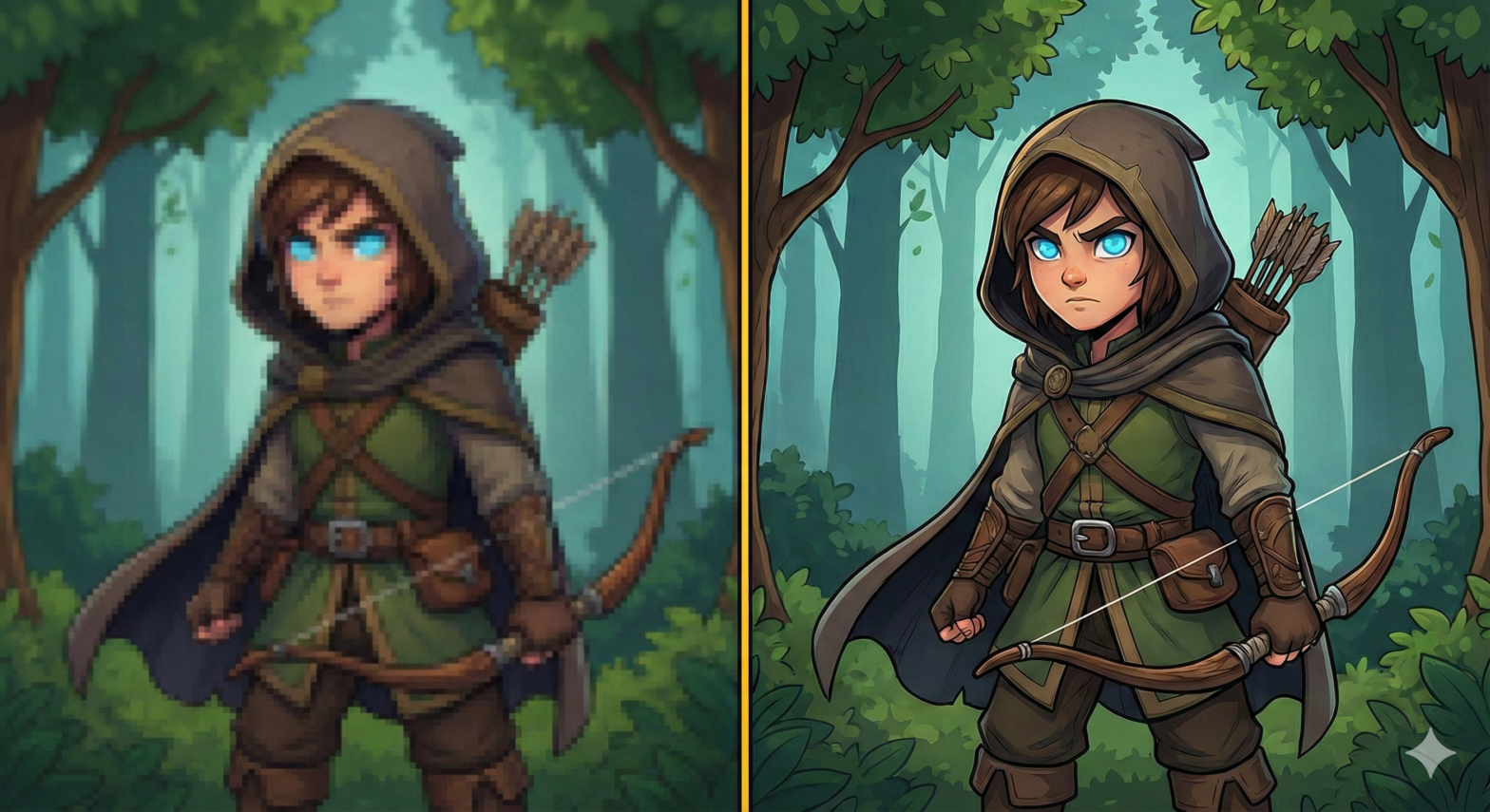
We have all been there. You send your company logo to be printed on a large banner, excited to see your brand huge and impressive. But when the proof comes back (or worse, the final product), your crisp logo looks like a blocky, fuzzy Minecraft character. “But it looked fine on my phone!” you say.
Welcome to the most common battle in the design world: Vector vs. Raster. At SpeedPro Medicine Hat, we aren’t just sign makers; we are image protectors. We ensure your brand looks professional at any size, whether it’s on a business card or a billboard. To do that, we need to talk about “math” versus “dots.”
Don’t worry, we’ll keep it fun.
The Raster Image: The “Dot” Problem
Most images you see online (JPEGs, PNGs, GIFs) are Raster images. Think of a raster image like a mosaic tile floor. It is made up of thousands of tiny colored squares called “pixels.”
When you look at it from a distance (or on a small phone screen), it looks like a smooth picture. But if you try to stretch that mosaic to cover a whole wall, you have to make the tiles bigger. Suddenly, those smooth curves turn into jagged staircases.
The Rule: You generally cannot make a raster image larger without losing quality. It becomes “pixelated” or blurry.
- Common Raster Files: .jpg, .png, .gif, .tif
- Good for: Photos, website graphics.
- Bad for: Large signs, vehicle wraps, resizing.
The Vector Image: The “Math” Solution
Vector images are different. Instead of a grid of dots, they are built using mathematical formulas (points, lines, and curves). When you tell a computer to resize a vector file, it doesn’t just stretch the picture. It recalculates the math. It says, “Draw a red circle with a 10-foot radius” instead of “Draw a red circle with a 2-inch radius.”
The result? Crisp, razor-sharp lines whether you print it on a postage stamp or the side of a 747 airplane.
The Rule: Vectors are infinitely scalable. They never lose quality.
- Common Vector Files: .eps, .ai (Adobe Illustrator), .pdf (sometimes), .svg
- Good for: Logos, text, large format printing, vehicle graphics.
- Bad for: Photographs (you can’t “vectorize” a photo of a person easily).
“I Only Have a JPEG! Is All Hope Lost?”
This is the question we hear most often at SpeedPro. The answer is: No, we can help.
If you only have a small, blurry JPEG of your logo, you shouldn’t just print it and hope for the best. A blurry sign sends a message to your customers that you don’t care about details.
Our design team in Medicine Hat specializes in Vectorization. We can take your pixelated raster image and manually redraw it as a crisp vector file. It’s like tracing, but with high-tech software and a lot of skill.
Once we recreate your logo as a vector, you own that file forever. You can use it for your vehicle wraps, your storefront signage, and even your embroidered uniforms.
The SpeedPro Check
Before we print a single inch of vinyl, we inspect your files. If we see that your image is going to print blurry, we will stop the press and let you know.
We believe your brand deserves to look its best. We don’t just hit “print”—we partner with you to ensure the final product is sharp, professional, and impactful.
Unsure if your file is ready for the big stage?
Send it over to us. We’ll take a look, tell you if it’s a Raster or a Vector, and help you get it print-ready.